MR & AI Interaction Design
Reimagining Home Design in Mixed Reality
Type
Self-initiated
Tool
Figma · Unreal Engine · After Effects
Role
Mixed Reality Design
AI Interaction Design
Deliverables
End-to-end Spatial UX Design
Speculative MR Interaction Prototype

Home design is still guesswork. People choose furniture based on photos that don’t show real scale, try mixing old and new pieces without knowing what truly fits together, and have no way to preview lighting, flow, or overall comfort until they’re already living in the space.
The goal of this project was to explore how spatial computing and AI could help families design their living spaces more intuitively, bridge the gap between digital planning and physical reality, and support real-world decision-making through an immersive mixed reality (MR) experience.
Solution
Spalce—rooted in “Space” + “Pal”—is an AI-powered mixed reality tool that transforms real rooms into full-scale, testable design environments. By combining spatial computing, multimodal interaction, and transparent AI guidance, Spalce reduces guesswork and enables confident, context-aware decisions in the place that matters most—your actual home.
What makes Spalce different

Full-scale MR inside your actual room, not just 3D on a flat screen.

Multimodal control (eyes, hands, voice) designed for low-friction home planning.

AI works as a transparent co-designer, not a black-box layout generator.
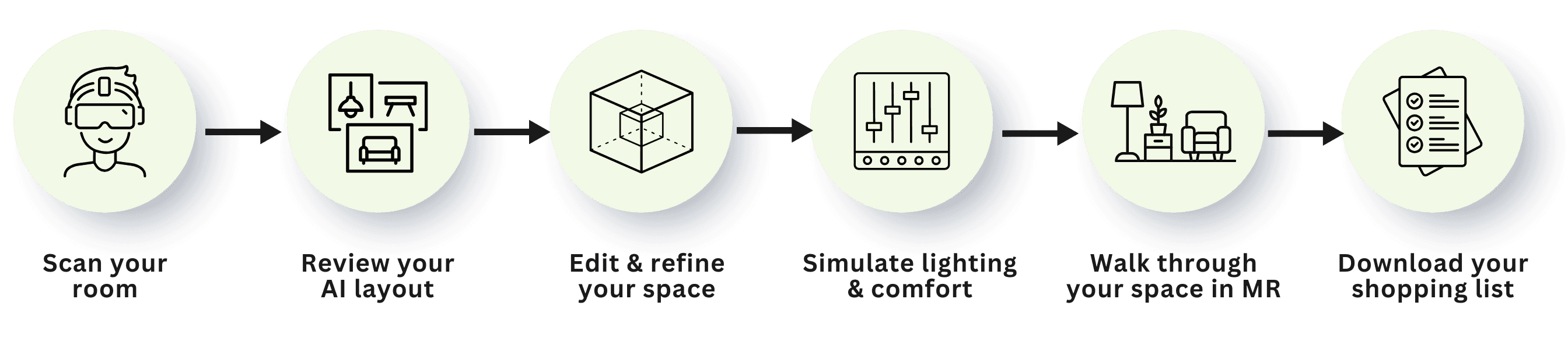
Spatial Design Journey
A seamless spatial workflow that transforms real rooms into testable futures—guiding users from capture to full-scale validation.
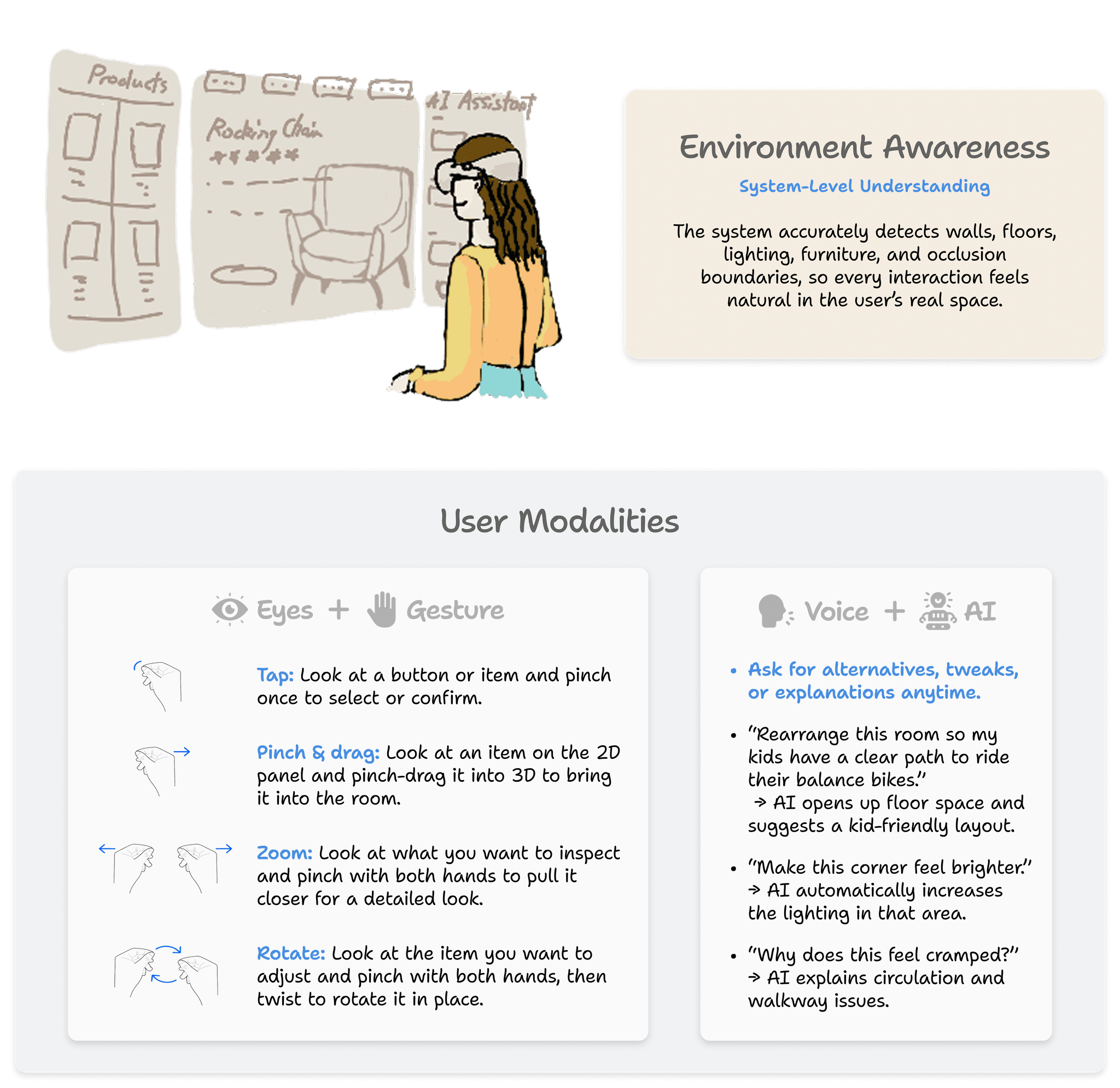
Multimodal Interaction System
Spalce combines gaze, gesture, and voice with real-world environmental awareness to create a low-friction, spatially intuitive workflow for home design.
AI as a Collaborative Design Partner
Accessible Entry Options
Designed to support different preferences, abilities, and situations.
Look at the floating AI orb and pinch to open it.
Say: “Hi Spalce—assist me with this room.”

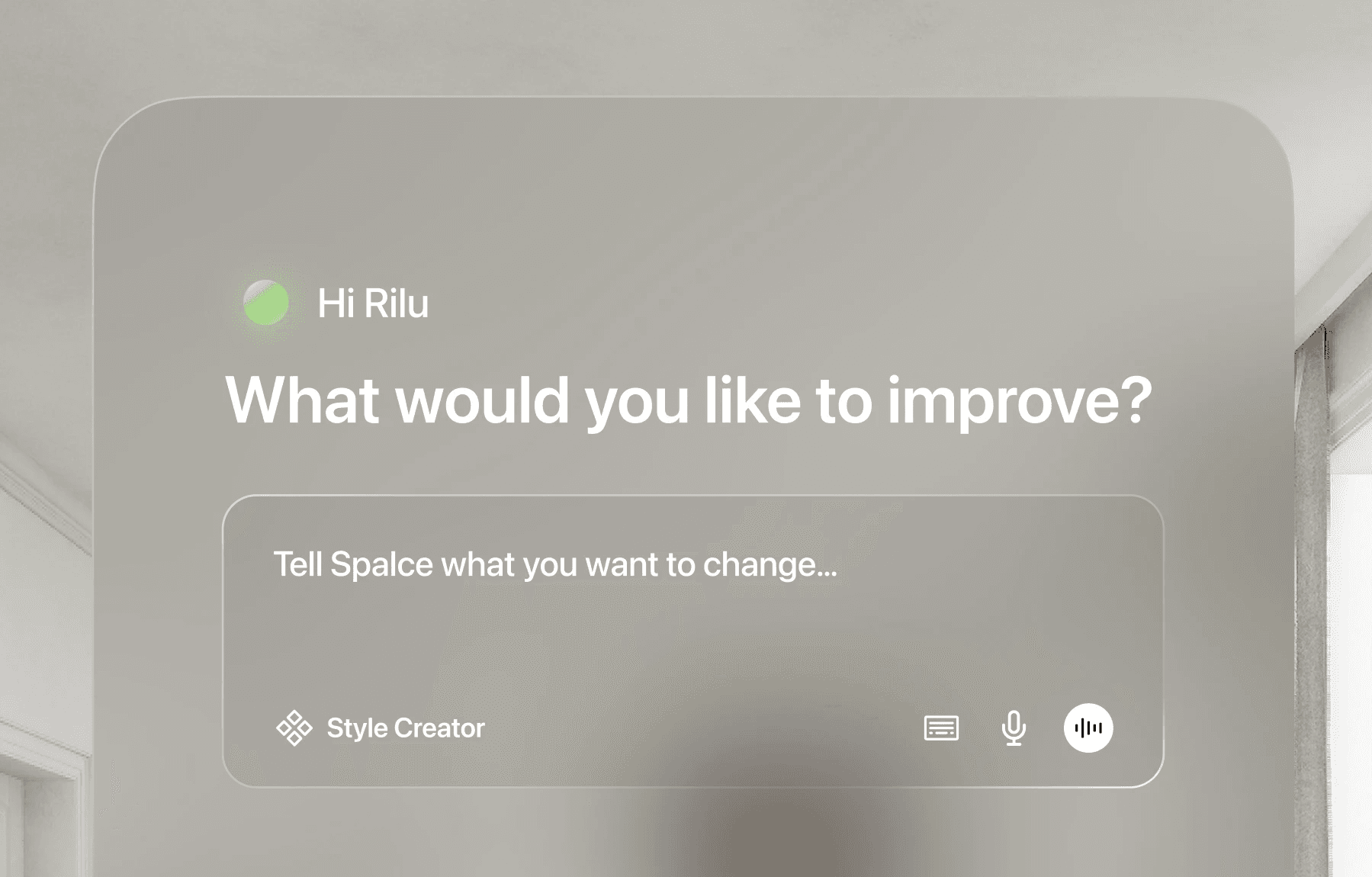
Hero Prompt as the Primary Focus
The large input field keeps the prompt as the primary focus, so users can start their main workflow instantly without extra steps.
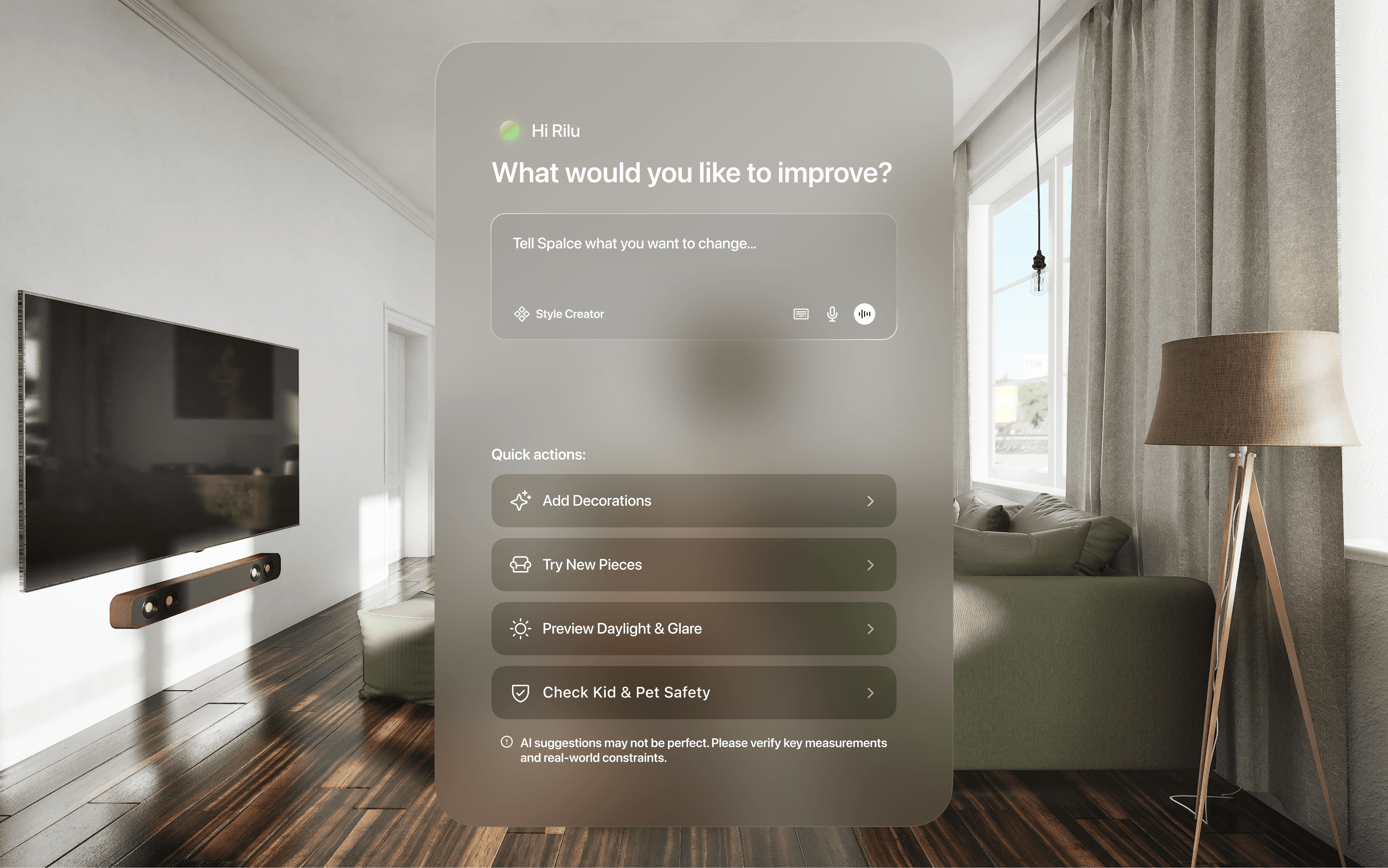
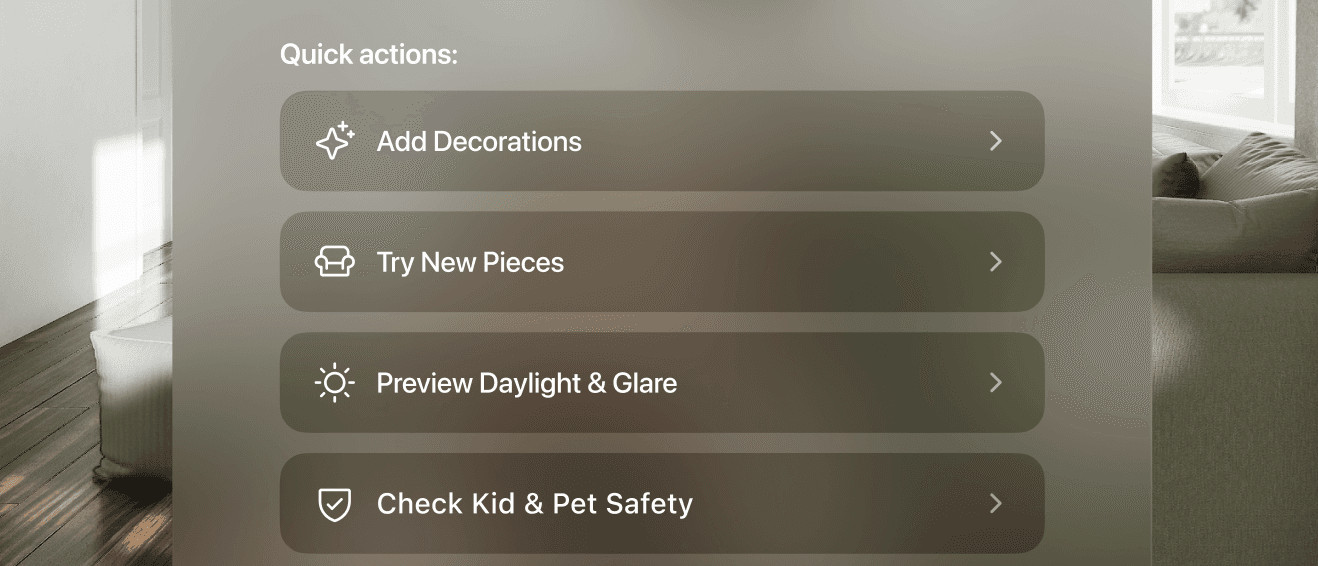
Contextual Quick Actions for Faster Starts
Quick actions below the prompt are tailored to the most common tasks and updated based on users’ recent prompts, so users can jump into specific workflows instantly, reduce friction, and improve task efficiency.
Loading State
Spalce shows what the AI assistant is analyzing in real time, so users know what’s happening and what to expect.
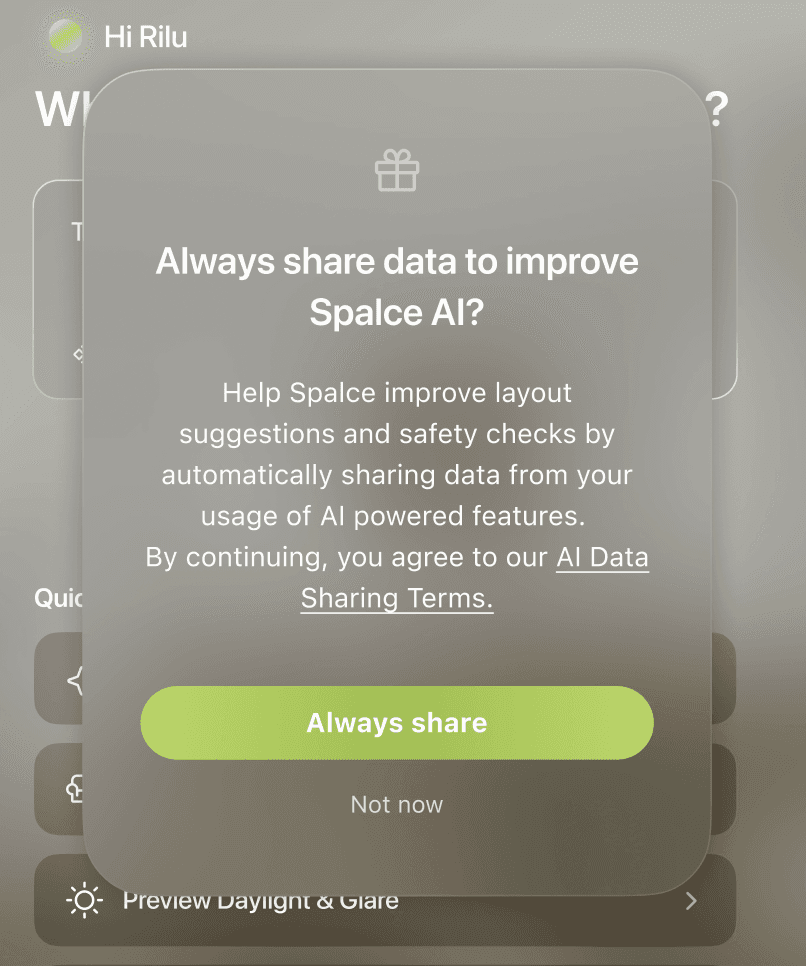
Give Users Full Control over data sharing
Spalce clearly explains AI data sharing and gives users control with options like “Always share” and “Not now.”
Multimodal Input
Spalce supports text, voice, and live conversation so users can choose the fastest, most comfortable way to interact in different situations.

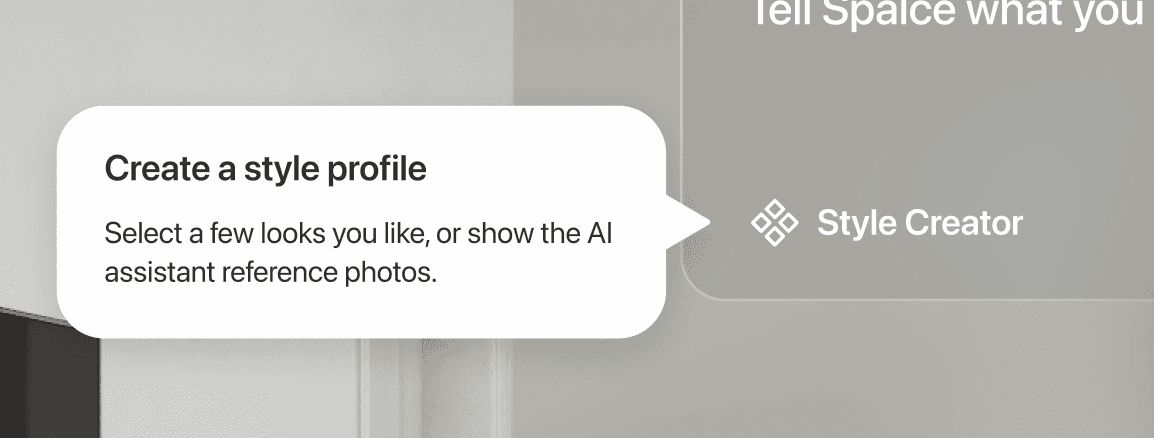
Create a Style
Style Creator helps lock in style preferences or align couples on a shared design language.
Transparency Disclaimer Builds Trust
A brief disclaimer sets clear expectations that AI suggestions may be imperfect, encouraging users to double-check key details.

Solution Walkthrough
You can jump directly to [My Reflection],
or keep reading to learn how those ideas came together.
Research
Goals
To guide the discovery phase, I defined three research goals:

Understand how people plan and set up their homes when moving into a new space.
Identify the challenges and frustrations people face throughout the process.
Explore how AI and MR could support easier, more accurate, and enjoyable home design.
User Interviews
To explore these goals, I interviewed 5 target users about their recent moving experiences and synthesized their responses into an affinity map.
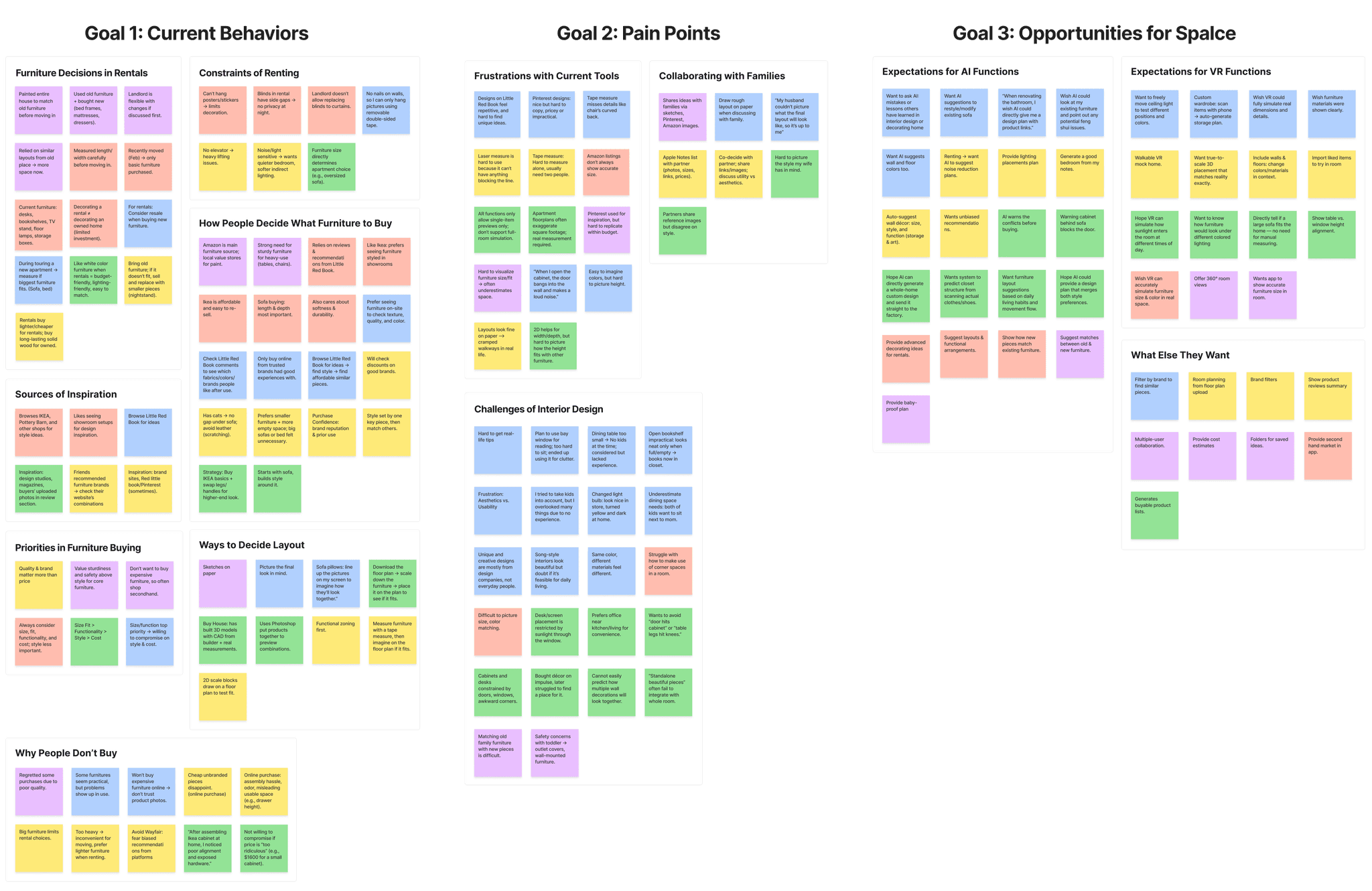
Synthesizing the affinity map revealed 4 key insights:
People struggle to picture how furniture will work in the actual room.
People can’t tell how furniture will relate to the room or to other pieces—whether something will feel too tall, crowd a pathway, or block doors once it’s actually in the space.
Mixing old and new furniture is guesswork.
People want to mix what they already own with new pieces, but no tool can recommend items that truly fit with what they have or let them compare different combinations to choose the best match.
Lighting, flow, and comfort stay invisible.
Sunlight, glare, pathways, and overall “feel” only show up after move-in, and no tool simulates them in the real room.
Couples lack a shared mental model of the space, making collaborative decisions difficult.
Couples struggle to form a shared understanding of how the space should look and feel, so one partner often takes over because the vision they have in mind is hard to communicate clearly.
Competitive Analysis
I conducted a competitive analysis to understand where existing tools fall short and where Spalce could offer something meaningfully different. The matrix below summarizes the most relevant feature gaps and opportunity areas.
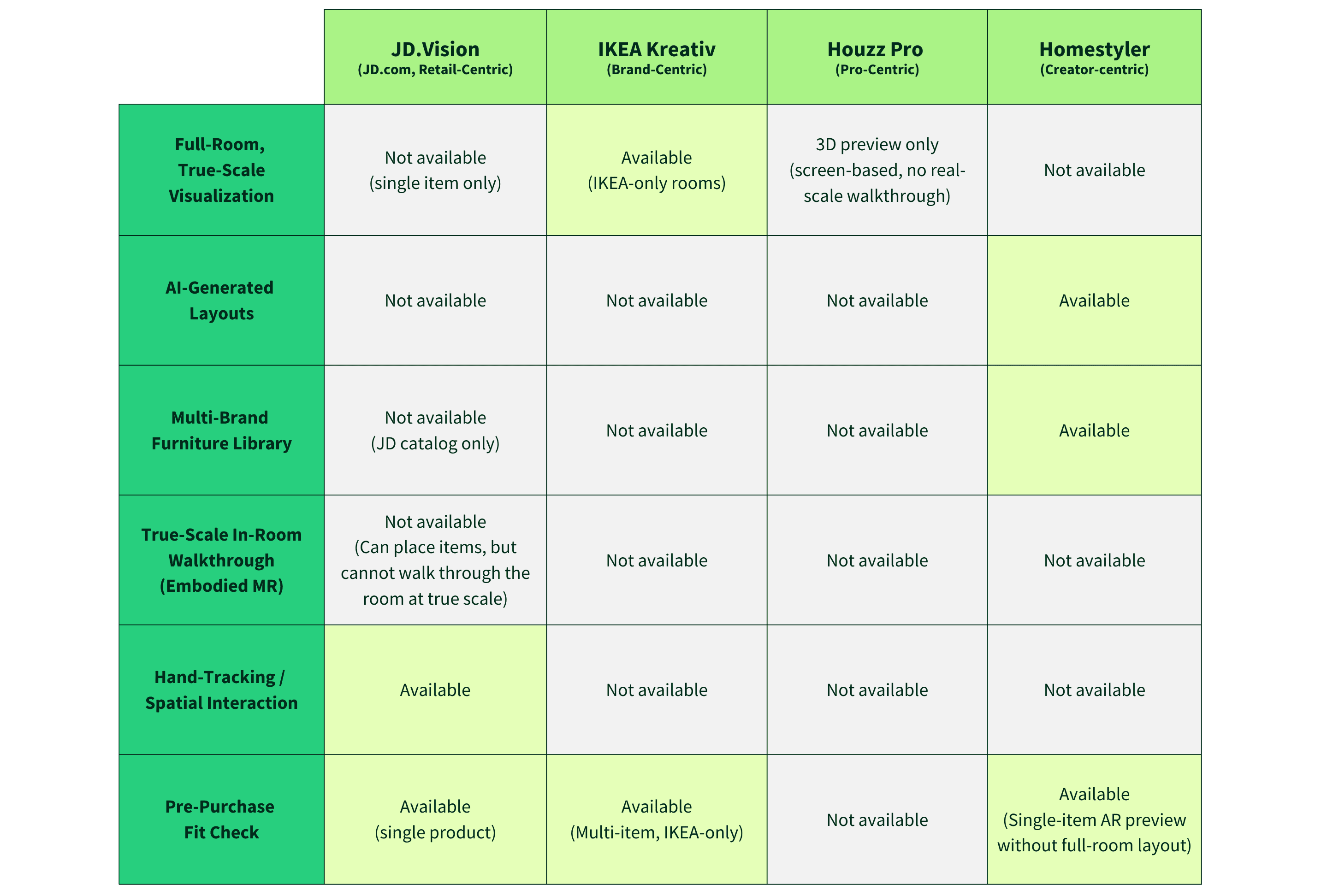
Together, these gaps revealed 4 opportunities that guided Spalce’s product direction:
Enable true-scale MR walkthroughs that let users walk through layouts at full scale, using their own bodies to judge space, distance, and fit before purchase.
Combine AI layout suggestions, hands-on spatial editing, and full-scale walkthroughs into one continuous flow, so users can move from exploration → adjustment → validation without switching tools.
Allow users to place and compare furniture from multiple brands in the same room, instead of being limited to a single brand or retailer’s catalog.
Help users see how their existing furniture and new pieces from different brands work together in the same space before buying anything new.
Ideation
What Users Need
In this phase, I synthesized research findings into clear jobs, constraints, and decision points that shaped early ideation.
Rather than jumping directly to features, I focused on what users were actually trying to decide and validate before moving in or buying new furniture. To ground these decisions, I used the Jobs-to-Be-Done (JTBD) framework to stay centered on users’ real goals instead of surface-level feature requests.
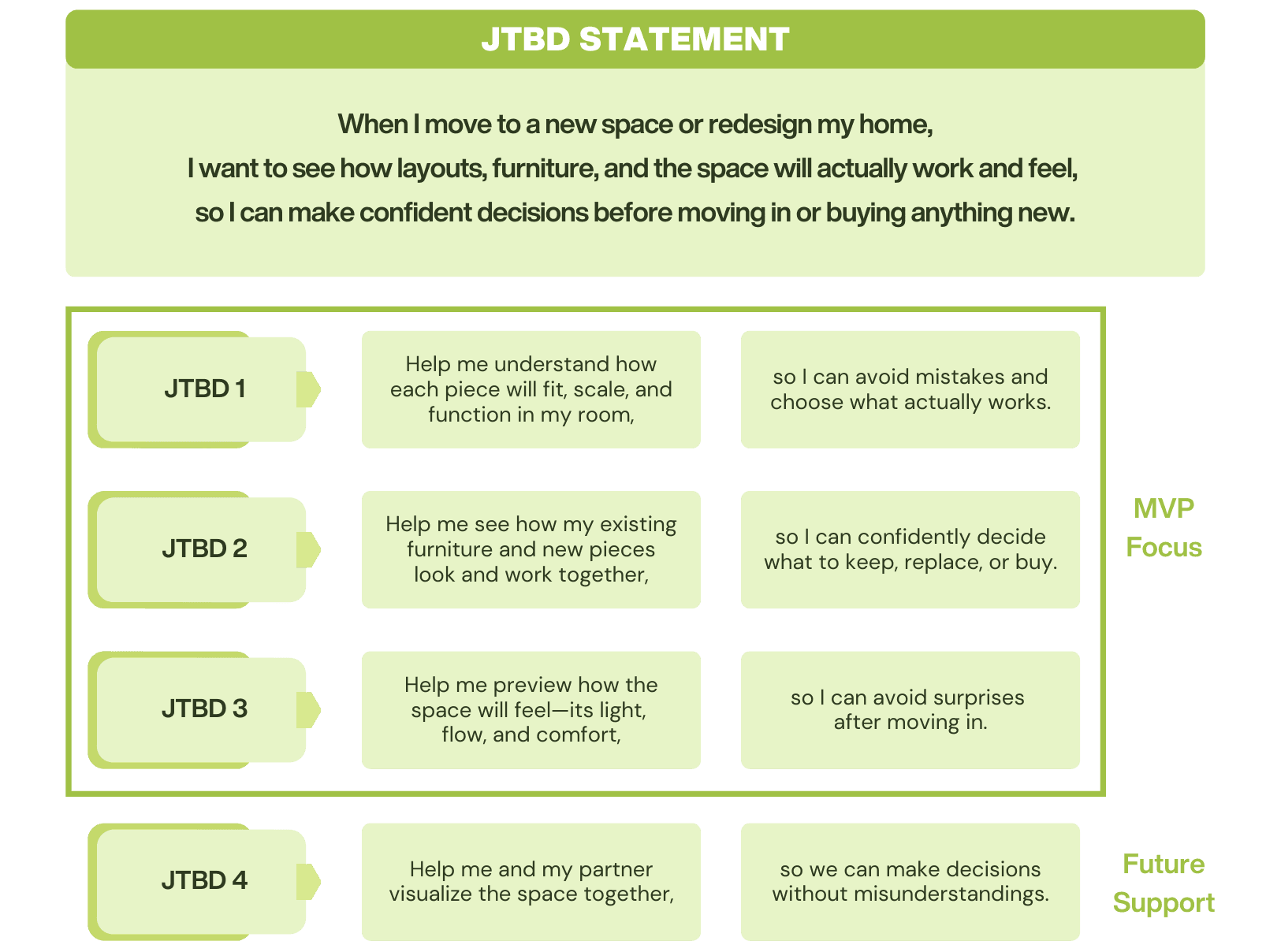
For the MVP, I prioritized the jobs most closely tied to pre-purchase decision-making and spatial confidence, while treating shared visualization as a secondary but important support need.
Core Flows
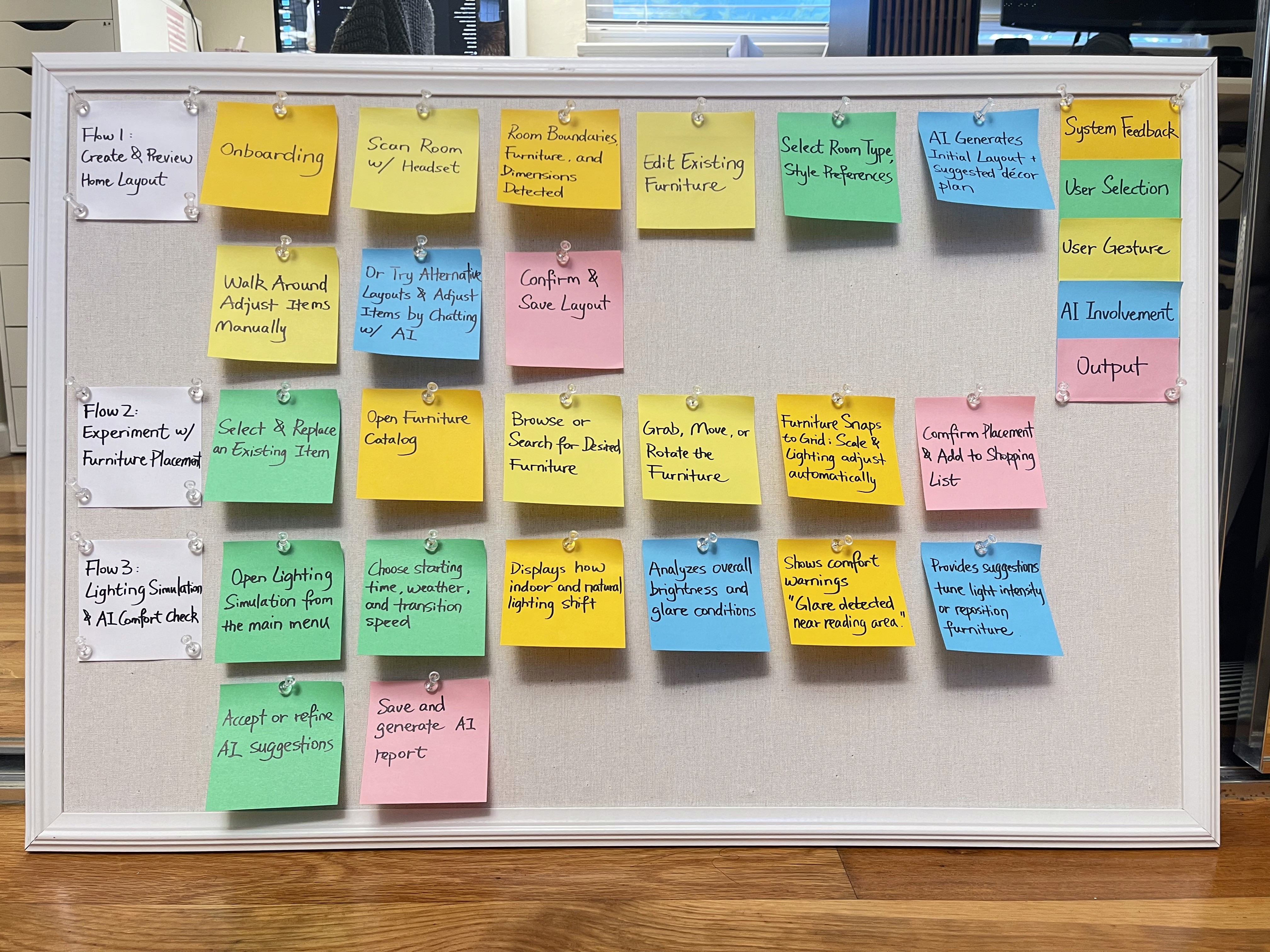
To move from jobs to concrete design decisions, I mapped out core flows that translate each JTBD into specific user actions and system responses.
These flows helped me clarify:
what users do step by step,
when AI support is helpful,
and where users need direct spatial feedback to make decisions.
Rather than designing isolated features, I focused on creating end-to-end flows that move users from exploration → adjustment → validation without switching tools or contexts.
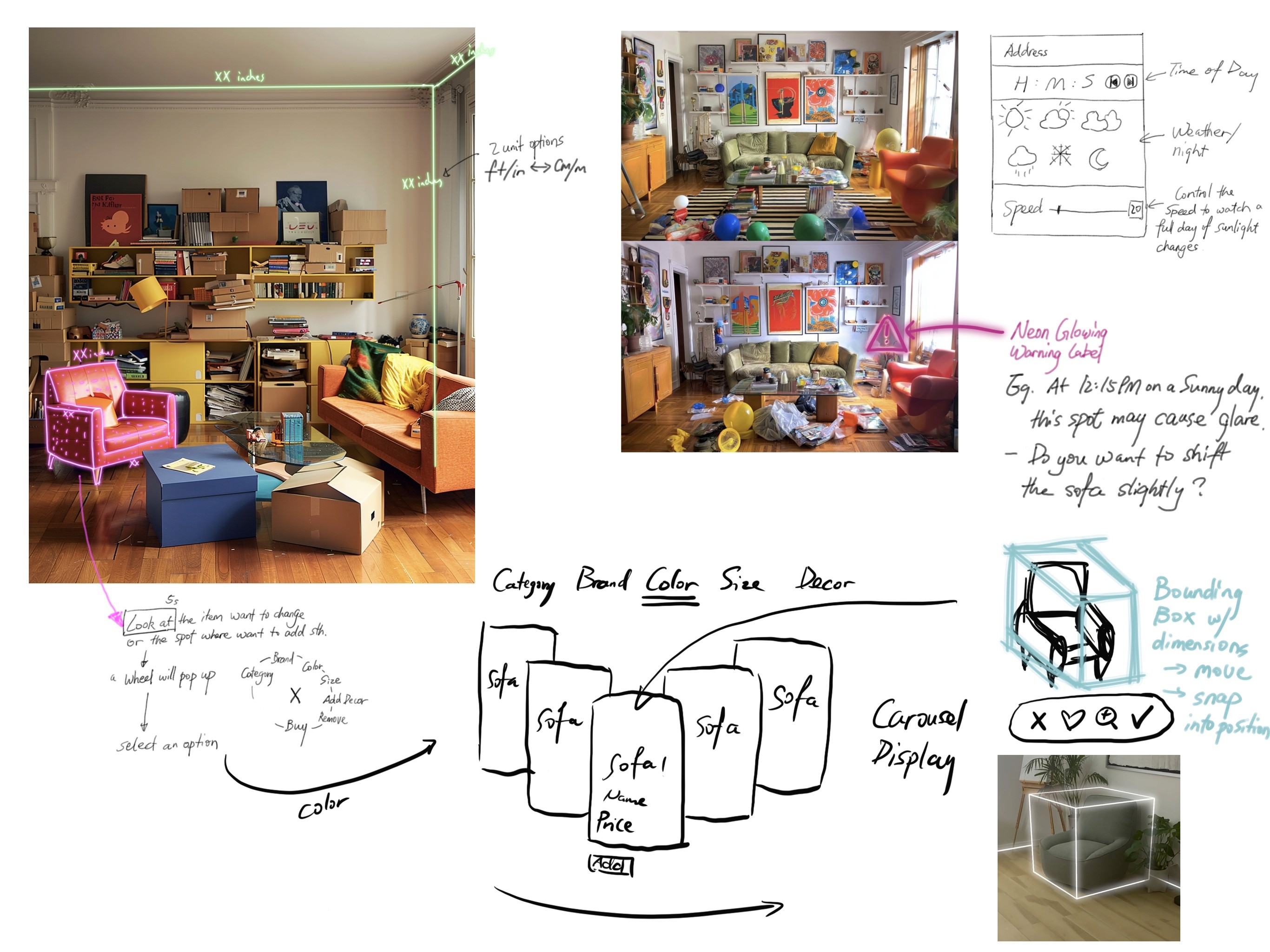
Early Spatial Sketches
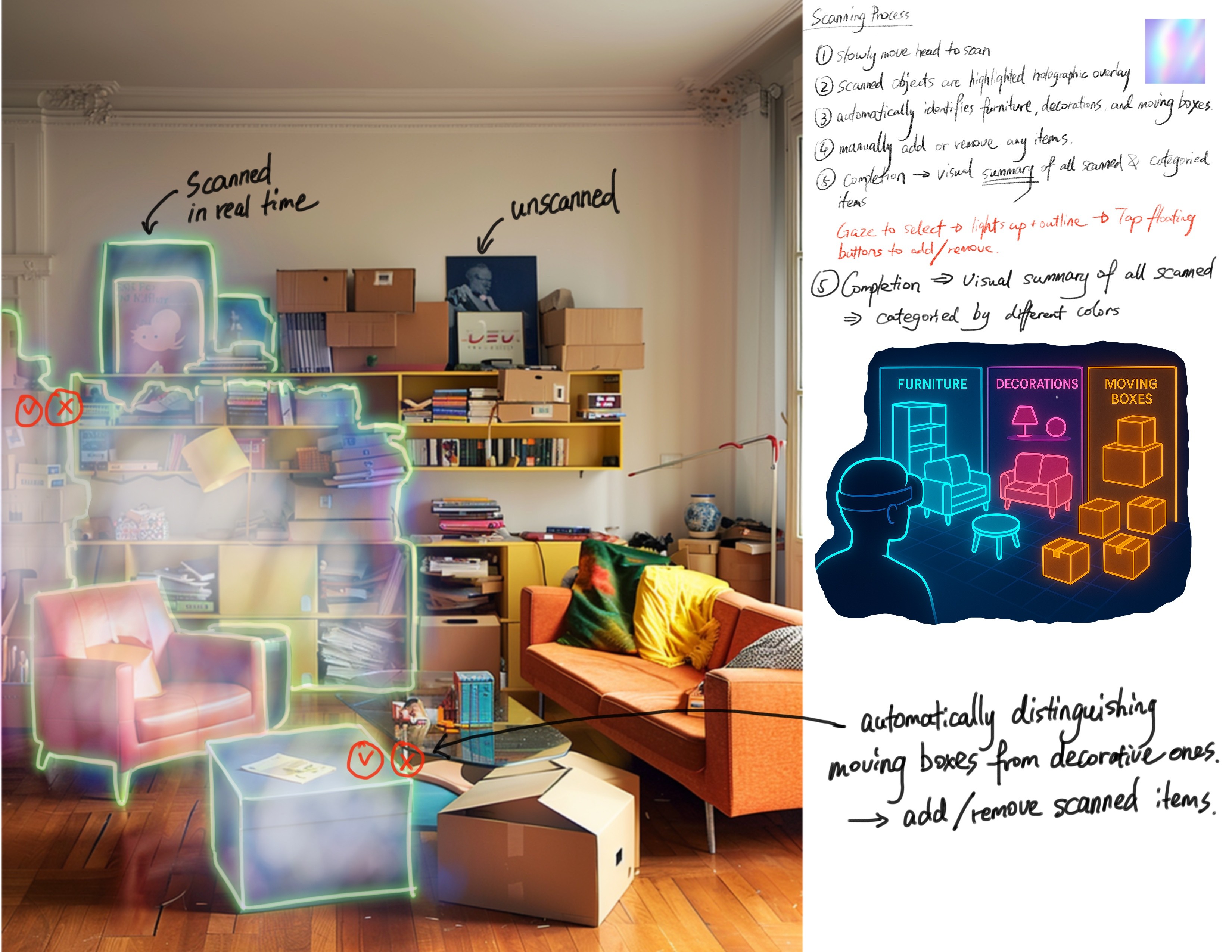
I created early spatial sketches to reason through how the system would understand and represent the real environment at room scale.
These sketches explored:
scanning the room in real time,
identifying and classifying objects (furniture, decor, moving boxes),
and visualizing boundaries, dimensions, and zones users can interact with.
This process helped me align system perception with how users already think about their space—what feels movable (such as sofas, tables, and chairs), what feels fixed (such as walls, windows, and doors), and what should or shouldn’t be included in layout decisions (like moving boxes or temporarily stored items).
Interaction Explorations
I explored different interaction patterns to test how users might adjust layouts, respond to AI suggestions, and build trust in spatial and comfort-related feedback.
These explorations focused on:
selecting and modifying furniture directly in the space,
previewing layout alternatives without losing context,
receiving clear visual cues about lighting, glare, and comfort issues,
and deciding when to accept, adjust, or ignore AI suggestions.
Instead of optimizing for speed or automation, I prioritized interactions that support understanding, comparison, and confidence, especially at moments where users hesitate before committing to a decision.
To see how these insights shaped the final outcome,
you can jump back to the [Solution].
My Reflection
I plan to further explore these three areas:
Translating the full spatial workflow into detailed UI screens to clarify how scanning, environment understanding, multimodal control, and AI guidance come together in the actual product experience.
Refining multimodal interactions by exploring how gaze, gesture, and voice can complement each other to make spatial control smoother, faster, and more intuitive.
Strengthening how the AI adapts over time so recommendations become more aligned with different user preferences, and its reasoning becomes clearer, more contextual, and easier to trust.
This project changed how I see design.
Through this project, mixed reality stopped being a futuristic concept and became a medium I could genuinely design with. Building Spalce showed me how design shifts when it leaves the flat boundaries of a screen and enters full-scale space—where interactions are shaped by bodies, movement, and the physical world around us.
And Spalce's potential goes far beyond interior design.
The same spatial workflow can reimagine how we customize closets and kitchens, visualize how a production line comes together, or prototype stage layouts directly in real environments. Mixed reality turns everyday places into interactive, spatial canvases where ideas can be placed, tested, and experienced. In this medium, the boundaries of design are no longer dictated by screens, but only by imagination.
Next
Project
